
For a long time LeadGen.tools was a box of tools. You could scrape Google, pull emails from websites, spy on ads. Useful, but you still had to do the hard part yourself: figure out who to contact, write something they would actually read, and remember to follow up.
So we asked ourselves a simpler question. What would it take to go from “here is my website” to “people are answering my emails” without spending a week on it?
This post is the answer. Here is what changed, with real screenshots.
1. Try it on your own website first
You type your website. That’s it. LeadGen.tools reads it, works out what you sell and who buys it, and picks the best type of customer to start with. Then it goes to Google Maps and pulls real businesses that fit, in your city or wherever your customers are.
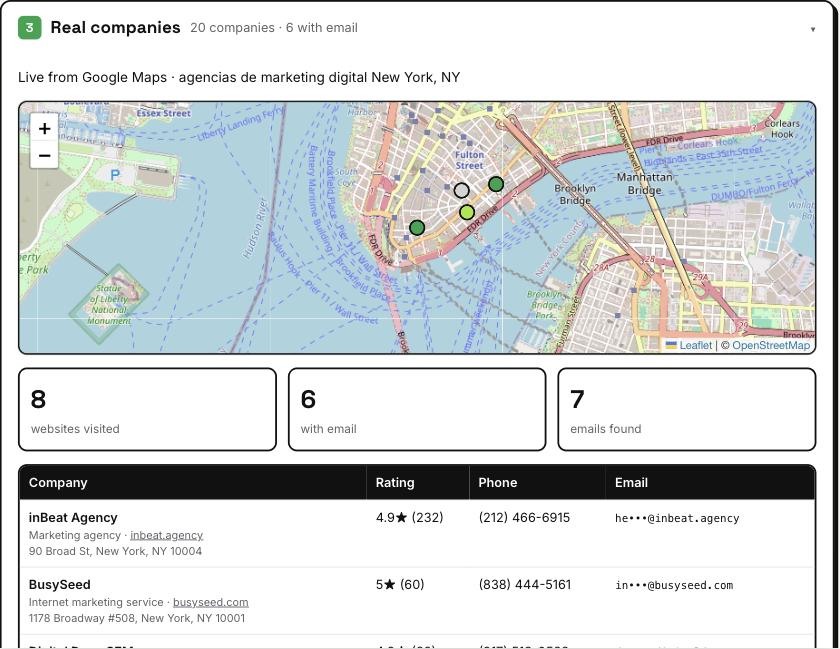
No signup, no credit card. It takes about a minute and everything you see is real data, not a mockup.
2. It finds the person who decides
Writing to info@ works sometimes. Writing to the owner, or to the person who actually buys what you sell, works a lot better.
For each company, LeadGen.tools looks at the team, then the AI ranks them by who is most likely to care about your offer and to reply. It tells you why it picked that person. We only use emails that are verified, so you don’t burn your domain on addresses that bounce.
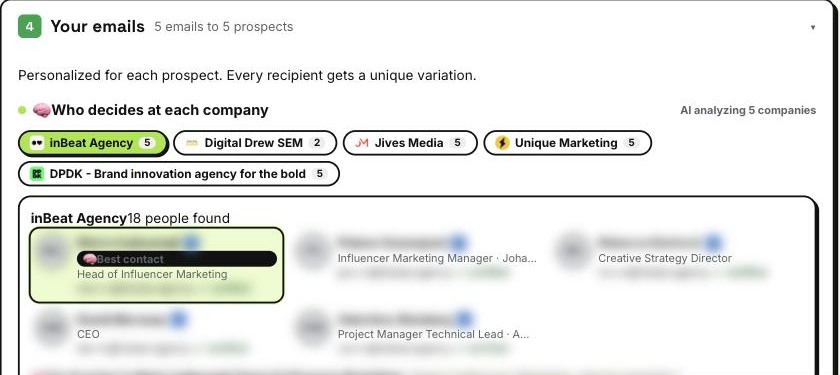
If you want to reach two or three people at the same company, you can. They get separate emails a couple of days apart, and as soon as one of them answers, the others stop receiving anything.
3. Every email is different, and the follow-ups send themselves
Each prospect gets an email with a first line about their own business, signed with your name. Then two follow-ups go out on their own, as replies in the same conversation, so it reads like a real thread and not like a new blast.
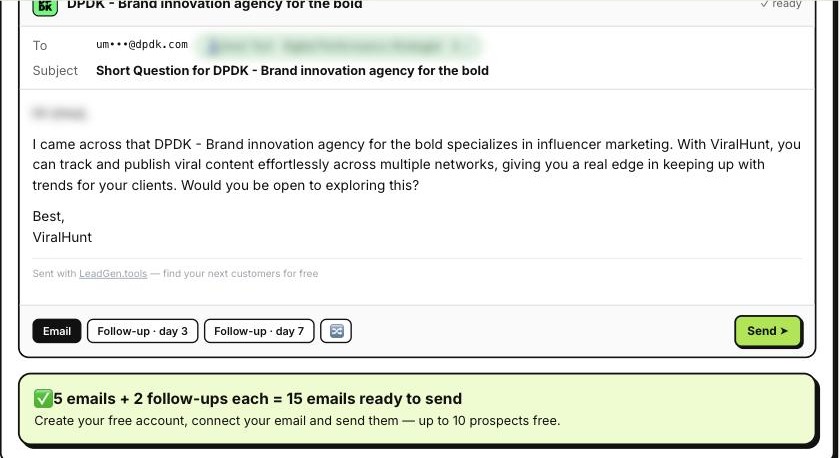
Why so much care with follow-ups? Because that’s where most replies come from. In Belkins’ 2026 data, 58.6% of replies came from a follow-up, not from the first email. Most people just never send them.
4. Inside the app: a campaign in one screen
Once you have an account, “New campaign” does the same thing at a bigger scale. You tell it who you want to sell to and where. It chooses the cities (biggest first), searches Google Maps in each one, and the AI drops the companies that are a bad fit: big chains, franchises, directories, competitors. You see each discarded company with the reason.
You can let it run on automatic, or go step by step and decide the cities, how many prospects, how many follow-ups (up to five) and how many days between them. Every email stays editable. Change a line yourself, or tell the AI “make it shorter” or “offer a free audit” and review what it proposes before saving.
5. Replies, sorted for you
When someone answers, the AI reads it and labels it: interested, wants a meeting, has a question, not interested, out of office. The “Replies” page puts the hot ones on top with a one-line summary, so you know who to call first.
Out of office replies don’t stop anything, the sequence just waits until the person is back. People who say no or ask to be removed are never emailed again from your account.
6. It sends from your own email, like a person would
- Connect Gmail in one click, or any mailbox with SMTP (Zoho, GoDaddy, Hostinger, cPanel and more).
- Emails go out on weekdays during business hours, a few at a time, with random pauses in between.
- If too many emails bounce, the campaign pauses by itself and tells you.
- We check your domain’s email setup (MX, SPF, DKIM, DMARC) and tell you if something is missing.
7. For developers and AI agents
Everything above is also available through our API: find companies, find the decision makers, verify emails, write sequences, launch campaigns and read the replies with their category. We also packaged it as a skill for OpenClaw and other AI agents, so you can ask your agent something like “find 20 dental clinics in Austin, get the owners’ emails and draft a 3 email sequence” and it knows how to do it.
How pricing works now
We made it simple. Searching is free (with a daily limit per plan). You pay one credit per company you contact or export, once, and the follow-ups are included. The free account lets you run a real campaign to 10 prospects with follow-ups, no credit card.
If you tried LeadGen.tools a while ago and left because it felt like too many tools, give it another look. Start with your own website and see who it finds.